
AI Puffer Cloud
Start using AI in WordPress. No API key needed.
Connect AI Puffer Cloud, verify your email, and choose a model. Eligible accounts receive 25 free credits every month, with optional credit top-ups when you need more.
One Cloud connection across your AI tools.
Use supported models for chatbots, content writing, AI Forms, automations, images, speech, transcription, and embeddings. Features depend on the selected model and your plugin plan.
Write and answer
Choose from supported models by OpenAI, Anthropic, Google, and more. Pick the model in the module where you work.
Create and listen
Generate images and use speech or transcription models where supported. Cloud image editing, video, and realtime voice are not currently supported.
Use your knowledge
Create embeddings through Cloud and keep your knowledge in Local storage on your WordPress site, or in a compatible external vector store.
Connect from WordPress.
Choose AI Puffer Cloud.
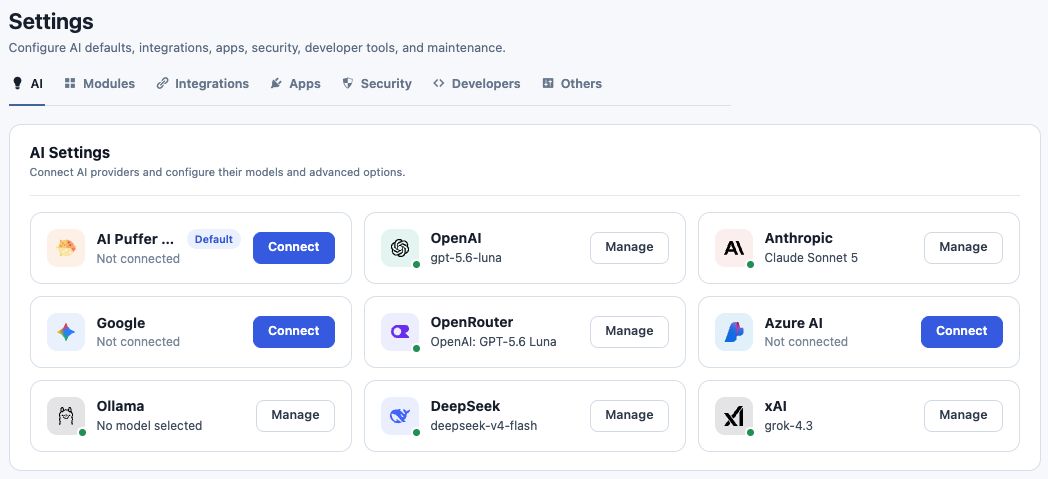
Open onboarding or Settings > AI. Check your account email, accept the connection terms, and click Connect.
Confirm your email.
If confirmation is needed, open the Freemius email, verify your address, and return to WordPress to check again.
Use your preferred tool.
Select a Cloud model in Chatbot, Content Writer, AI Forms, Images, or another supported module.
Credits for the AI you use.
Cloud credits pay for hosted requests. Costs depend on the model and operation. Text requests use token-based pricing with a model minimum; images, audio, and embeddings have their own rates. Model-picker estimates are examples, not a fixed price for every request.
Monthly free allowance
Eligible verified accounts receive 25 credits per month. Free credits expire at the end of the allowance period and do not accumulate.
Optional top-ups
Buy more credits from Usage when you need them. Purchased credits do not expire and are shared across sites connected to the same account.
Usage visibility
See your current balance, renewal date, request history, and credits used in WordPress.

Free or Pro. Cloud or your own keys.
Cloud is optional and available with both plugin plans. Pro unlocks additional plugin features; it does not include unlimited AI usage. You can keep your existing provider connections and choose them in any supported module.
Cloud questions
Does every request cost one credit?
No. Credit usage depends on the model, request size, and operation. Text generation has a model-specific minimum, and longer responses may use more credits.
Where is Local knowledge stored?
Source text and vectors stay in your WordPress database. Text is sent to your chosen embedding provider to create vectors, and retrieved context is sent to your selected text model when you use it.
What if I run out of credits?
Cloud requests need an available balance. You can add credits in Usage or wait for an eligible monthly renewal. A lower output limit may help when a request needs a larger credit reservation.
Does subscribing to product emails connect Cloud?
No. Email updates are optional. Cloud connects only when you explicitly accept the connection terms and click Connect.
Can I disconnect?
Yes. Use Disconnect from the Cloud account controls in WordPress. Other provider connections remain available.